Building a Multi-Agent AI System
Today, I built a multi-agent AI system! The project is structured with a main.py file and a database.py file.
This isn't a super complex application, but it's a great example of how to take advantage of multi-agent systems. Essentially, it's a basic web research tool. However, instead of just visiting websites and extracting content, it creates a comprehensive research plan, has an AI perform a web search based on that plan, and then returns a summary of the results (including links!).
Database (database.py)
I used SQLite to build a simple database to store research plans.
- Every research plan has an
id,short_summary, anddetails. - Naturally, all the standard CRUD functions are implemented.
OOP Approach
I adopted an Object-Oriented Programming (OOP) approach to build this app.
- Tool Class: The base class for any tool that can be used by an agent. It includes a name, description, and parameters.
- Some tools I'll implement later using this base class:
StoreResearchPlanTool: Stores the research plan in the database.GetResearchPlansTool: Retrieves all research plans from the database.DeleteResearchPlanTool: Deletes a research plan from the database.
- Some tools I'll implement later using this base class:
- Agent Class: The base class for an agent that can interact with the OpenAI API.
- Specialized Agents: Alongside the base classes, I have some specialized agents that can register and use tools:
ResearchPlannerAgent: An agent that uses tools to plan a research project. The user provides a topic, and this agent goes back and forth with the user to refine the research plan. It has access toStoreResearchPlanTool,GetResearchPlansTool, andDeleteResearchPlanTool.WebSearchAgent: An agent that performs web searches based on a research plan. It has no access to any tools. Does that technically make it an agent? Who cares, let's move on!SummaryReportAgent: An agent that generates a summary report based on the web search results.
Brave Web Search API
I used the Brave Web Search API to perform the actual web searches.
- It's a simple API that takes in a query and returns a list of search results.
- Best of all, we can use it for free with a limited quota.
The Application Flow
- The user interacts with the
ResearchPlannerAgentto create a research plan. - The user can then choose to have the
WebSearchAgentperform a web search based on that plan. - Finally, the user can choose to have the
SummaryReportAgentgenerate a summary report based on the search results.
def main():
    agent = ResearchPlannerAgent()
    research_plan = agent.run()
    search_agent = WebSearchAgent()
    results = search_agent.run(research_plan)
    summary_report_agent = SummaryReportAgent()
    summary_report = summary_report_agent.run(results)

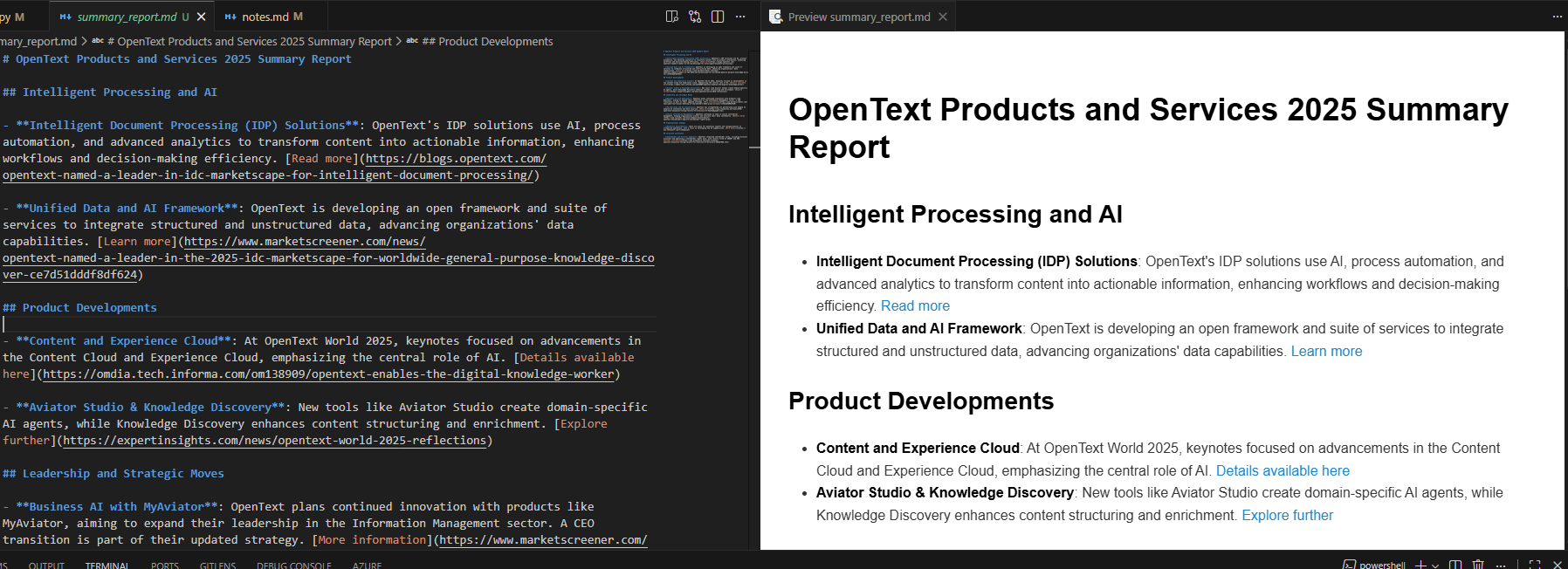
    with open("summary_report.md", "w") as f:
        f.write(summary_report)
Step 1: Define the Tool Class
class Tool:
    """
    The base class for a tool that can be used by the agent.
    """
    def __init__(self, name: str, description: str, parameters: Dict[str, Any]):
        self.name = name
        self.description = description
        self.parameters = parameters

    def get_schema(self) -> Dict[str, Any]:
        """
        return the schema of the tool
        """

        return {
            "type": "function",
            "name": self.name,
            "description": self.description,
            "parameters": {
                "type": "object",
                "properties": self.parameters,
                "additionalProperties": False,
                "required": list(self.parameters.keys())
            }
        }
    def execute(self, argument: str) -> str:
        """
        Execute the tool with the given argument.
        This method should be overridden by subclasses.
        """
        raise NotImplementedError("Tool.execute() must be overridden by subclasses.")

class StoreResearchPlanTool(Tool):
    """
    a tool that stores a user research plan into the database
    """

    def __init__(self):
        super().__init__(
            name="store_research_plan",
            description="Store a user research plan into the database.",
            parameters={
                "short_summary": {
                    "type": "string",
                    "description": "A brief summary of the research plan."
                },
                "details": {
                    "type": "string",
                    "description": "Detailed information about the research plan."
                }
            }
        )
    def execute(self, arguments: str) -> Dict[str, Any]:
        """
        Execute the tool with the given argument.
        """
        args = json.loads(arguments)
        try:
            result = database.add_research_plan(
                args["short_summary"], args["details"]
            )
            return result
        except Exception as e:
            return {"status": "error", "message": str(e)}
Agent Class
The base Agent class will have a client (the OpenAI client), a model name, messages (conversation history), and tools (a list of tools the agent can use).
Key methods include:
register_tool: Registers a tool for the agent to use._get_tool_schemas: Gets the schemas of the registered tools (starts with_to indicate it's a private method).execute_tool_call: Executes a tool call with the given tool name and arguments.run: Runs the agent.
class Agent:
    """
    The base class for an agent that can interact
    with open ai api
    """
    def __init__(self, model: str = "gpt-4o"):
        self.client = client
        self.model = model
        self.messages: list[Dict[str, Any]] = []
        self.tools: Dict[str, Tool] = {}
    def register_tool(self, tool: Tool):
        """
        Register a tool for the agent to use.
        """
        self.tools[tool.name] = tool
    def _get_tool_schemas(self) -> List[Dict[str, Any]]:
        """
        Get the schemas of all registered tools.
        """
        return [tool.get_schema() for tool in self.tools.values()]
    def execute_tool_call(self, tool_call: Any) -> str:
        """
        Execute a tool call and return the result.
        """
        fn_name = tool_call.name
        fn_args = json.loads(tool_call.arguments)

        if fn_name in self.tools:
            tool_to_call = self.tools[fn_name]
            try:
                print(f"Executing tool: {fn_name} with args: {fn_args}")
                # the return value of the fucntion is a dict, we need to convert it to string
                # to be compaltible with the openai api
                return str(tool_to_call.execute(tool_call.arguments))
            except Exception as e:
                return f"Error executing tool {fn_name}: {str(e)}"

        return f"Tool {fn_name} not found."
    def run(self):
        """run the agent.
        This method should be overridden by subclasses.
        """
        raise NotImplementedError("Agent.run() must be overridden by subclasses.")
Implementing ResearchPlannerAgent
This agent inherits from Agent.
- We need to register the tools.
- We need to
_set_initial_promptto let the agent know its role. - The
runmethod implements the main logic: it acts like a chatbot that goes back and forth with the user to refine the research plan.
def run(self):
        """run the agent.
        """
        print("Welcome to the Research Planner Agent, please enter your research task.")
        while True:
            user_input = input(
                "Your input (type 'exit' to quit, 'accept' to accept the plan and continue):")
            if user_input.lower() == "exit":
                print("Exiting the Research Planner Agent. Goodbye!")
                sys.exit(0)
            elif user_input.lower() == "accept":
                print("You have accepted the research plan. Proceeding to the next steps...")
                # Here you can add code to hand off the research plan to another agent
                prompt = "Please create a final version of the discussed research plan and return that plan, nothing else, no other comments."
                response = self.client.responses.create(
                    model=self.model,
                    input=self.messages
                )
                print("Final Research Plan:")
                print(response.output_text)
                return response.output_text
            # if user inout is not accept or exit, continue the conversation
            self.messages.append({"role": "user", "content": user_input})

            while True:
                response = self.client.responses.create(
                    model=self.model,
                    input=self.messages,
                    tools=self._get_tool_schemas(),
                )
                reply = response.output[0]
                self.messages.append(reply)

                if reply.type != "function_call":
                    print("Agent:", reply.content)
                    break
                tool_output = self.execute_tool_call(reply)

                self.messages.append({
                    "type": "function_call_output",
                    "call_id": reply.call_id,
                    "output": tool_output
                })
Quick Explanation of the run Method:
- The agent keeps asking the user for input until they type 'exit' or 'accept'.
- If the user types 'accept', the agent creates a final version of the research plan and returns it.
- If the user types anything else, the agent processes the input.
- If it needs to call a tool, it does so and appends the tool output to the messages.
- Otherwise, it prints the agent's reply and waits for the next user input.
- This loop continues until the user exits or accepts the plan. This allows the agent to interact with the user and use tools to help create a solid research plan.
SearchConfig Class
This is a simple dataclass to hold the search configuration.
class SearchConfig(BaseModel):
    """
    A search configuration.
    """
    search_terms: list[str]
    freshness: Literal["pd", "pw", "pm", "py"] | str = Field(
        ...,
        description="The freshness of the search results. 'pd' = past day, 'pw' = past week, 'pm' = past month, 'py' = past year"
    )
Why do we need this class?
We need a structured way to handle the search configuration data (i.e., search terms and freshness). This class is used by the WebSearchAgent to perform web searches based on the research plan.
Here is what a SearchConfig instance looks like:
search_config = SearchConfig(
    search_terms=["artificial intelligence", "machine learning"],
    freshness="pm"
)
WebSearchAgent Class
This is the one where we don't have to register any tools.
def _set_initial_prompt(self):
        """
        Set the initial prompt for the agent.
        """
        self.messages =  [
            "role": "developer",
            "content": f"""
                You are an expert in performing web searches.
                You will be given a research plan and you will need to derive a list of search terms that will be used to perform the search.
                The search terms should be derived from the research plan and should be as specific as possible.
                Focus on deriving impactful search terms that will help the user find the most relevant information.

                Also derive a value for the max age (freshness) of the web search results.
                Today is: {datetime.now().strftime("%Y-%m-%d")}
                """
        ]
In the run function, we use structured output parsing to get the search config from the agent's response.
def run(self, research_plan: str):
        """run the agent.
        """
        print("Web Search Agent is processing the research plan, deriving search terms and freshness...")
        self.messages.append({"role": "user", "content": "Here's the research plan based on which you should derive search terms: " +  research_plan})
        response = self.client.responses.create(
            model=self.model,
            input=self.messages,
            text_format=SearchConfig
        )
        search = response.output_parsed
        results = []

        for search_term in search.search_terms:
            print(f"Performing web search for term: {search_term} with freshness: {search.freshness}")
            url = "https://api.search.brave.com/res/v1/web/search"
            headers = {
                "Accept": "application/json",
                "X-Subscription-Token": os.getenv("BRAVE_API_KEY"),
            }
            params =  {
                "q": search_term,
                "freshness": search.freshness,
                "count": 10
            }

            response = requests.get(url, headers=headers, params=params)
            result = response.json()
            if "web" in result:
                web_results = result["web"]["results"]
                for web_result in web_results:
                    results.append({
                        "search_term": search_term,
                        "url": web_result["url"],
                        "description": web_result["description"],
                    })
            if "news" in result:
                news_results = result["news"]["results"]
                for news_result in news_results:
                    results.append({
                        "search_term": search_term,
                        "url": news_result["url"],
                        "description": news_result["description"],
                    })
            return results
In the run method:
- The agent takes a research plan as input.
- It derives search terms and freshness from that plan.
- It then performs a web search for each term using the Brave Web Search API.
- It collects the results and returns them as a list of dictionaries (containing the search term, URL, and description).
- This allows the agent to perform targeted web searches based on the user's plan. These results are then passed to the
SummaryReportAgent.
SummaryReportAgent Class
Also no need to register any tools here!
 def run(self, search_results: list[Dict[str, Any]]):
        """
        Runs the agent.
        """

        print("Summarizing search results...")
        self.messages.append(
            {"role": "user", "content": "Please create a summary (and keep the links!) based on these search results: " + json.dumps(search_results, indent=2)})
        response = self.client.responses.create(
            model=self.model,
            input=self.messages,
        )
        report = response.output_text
        if report.startswith("```markdown"):
            report = report[11:]
        if report.endswith("```"):
            report = report[:-3]
        return report
Result
base) (agents) PS C:\Users\ducth\git_repos\quicksight-01\code\ai-multi-agent> uv run .\main.py
Welcome to the Research Planner Agent, please enter your research task.
Your input (type 'exit' to quit, 'accept' to accept the plan and continue):I want to prepare for a 30-minute phone call fron recruiter from cpany called OpenText to learn more about my experience and share further insights into the role as well as the interview process. I want to make a good impression and prove that Iwill fit to company culture while still being myself and not trying to hard to please.
Agent: [ResponseOutputText(annotations=[], text="Preparing for a call with a recruiter involves a mix of research, self-reflection, and strategic planning. Here’s a guide to help you make a good impression:\n\n### Research the Company\n1. **Understand OpenText:**\n   - Learn about its products, services, mission, vision, and values. Visit their official website and follow recent press releases or news articles about them.\n   - Study their industry position, key competitors, and any recent changes or innovations.\n\n2. **Corporate Culture:**\n   - Look for employee reviews on platforms like Glassdoor to understand the company's culture.\n   - Identify keywords and phrases used by the company to describe its culture, such as innovation, teamwork, diversity, etc.\n\n### Know the Role\n3. **Position Details:**\n   - Revisit the job description to identify key responsibilities and required skills. \n   - Prepare examples from your past experience that align with these requirements.\n\n### Reflect on Your Experience\n4. **Your Story:**\n   - Be ready to succinctly explain your career journey, focusing on experience relevant to the role.\n   - Use stories and STAR format (Situation, Task, Action, Result) to illustrate your achievements.\n\n5. **Show Cultural Fit:**\n   - Highlight experiences where you exhibited qualities valued by OpenText’s culture.\n   - Be authentic; demonstrate how your values align with the company’s mission.\n\n### Prepare Questions\n6. **Ask Insightful Questions:**\n   - Enquire about team dynamics, company culture, career development opportunities, technology, or strategies.\n   - Express genuine interest in how you can contribute to their goals.\n\n### Practicalities\n7. **Technical Setup:**\n   - Ensure your phone connection is clear and you’re in a quiet environment.\n   - Have a notepad ready for any important notes or follow-ups.\n\n### Mindset\n8. **Be Yourself:**\n   - Stay confident and relaxed. Remember, the goal is to find a mutual fit between you and the company.\n   - Practice active listening; engage with what the recruiter shares.\n\nBy combining thorough research with personal reflection, you can convey genuine interest and suitability for the role while remaining authentic. Good luck with your call!", type='output_text', logprobs=[])]
Your input (type 'exit' to quit, 'accept' to accept the plan and continue):accept
You have accepted the research plan. Proceeding to the next steps...
Final Research Plan:
### Research Plan for OpenText Recruiter Call

#### Company Research
1. **Understand OpenText:**
   - Research products, services, mission, vision, and values via their website and recent press.
   - Study industry position, competitors, and recent changes.

2. **Corporate Culture:**
   - Read employee reviews on Glassdoor.
   - Note cultural keywords used by the company.

#### Role Understanding
3. **Position Details:**
   - Revisit job description for key responsibilities and skills.
   - Prepare relevant personal experience examples.

#### Personal Reflection
4. **Your Story:**
   - Prepare a succinct career journey narrative.
   - Use STAR format for achievements.

5. **Show Cultural Fit:**
   - Highlight experiences showing qualities valued by OpenText.
   - Align your values with the company’s mission.

#### Questions Preparation
6. **Ask Insightful Questions:**
   - Focus on team dynamics, company culture, development opportunities, technology, and strategies.

#### Practicalities
7. **Technical Setup:**
   - Ensure clear phone connection in a quiet environment.
   - Have a notepad ready for notes.

#### Mindset
8. **Be Yourself:**
   - Stay confident and relaxed.
   - Practice active listening.
Web Search Agent is processing the research plan, deriving search terms and freshness...
Performing web search for term: OpenText products and services 2025 with freshness: pw
Summary Report Agent is generating the summary report...
Summary Report Generated.